
For Pokémon TCG collectors
Collect like you know something.
Scan a card and know what it is, what it's worth and what a fair trade looks like. Built for people who love the cards, and for parents and kids who collect together.
A look inside
Real screens from the app, shown with a demo collection.
-
Raw or graded, all in one place
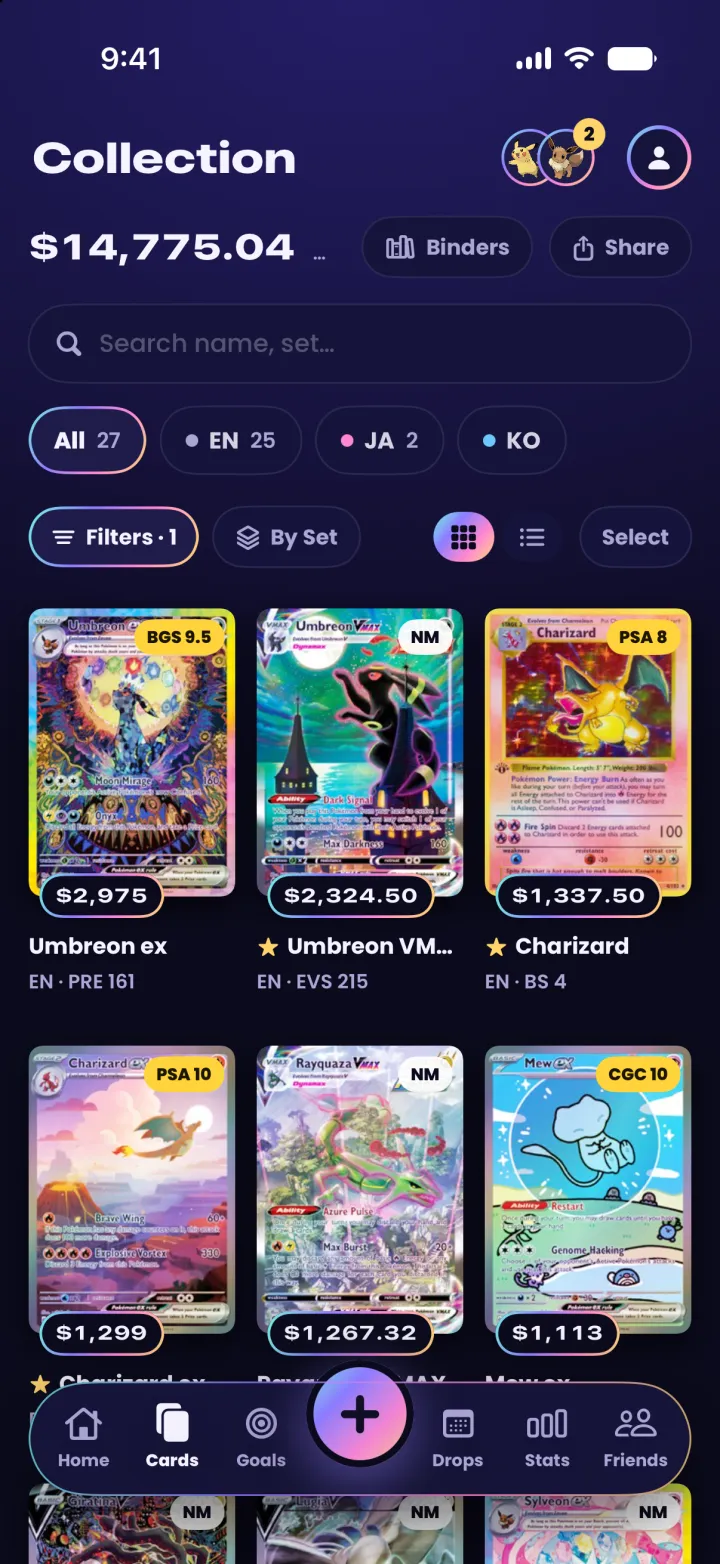
Sort by value, filter by set, language or grade, and keep the view you like as your default.
-
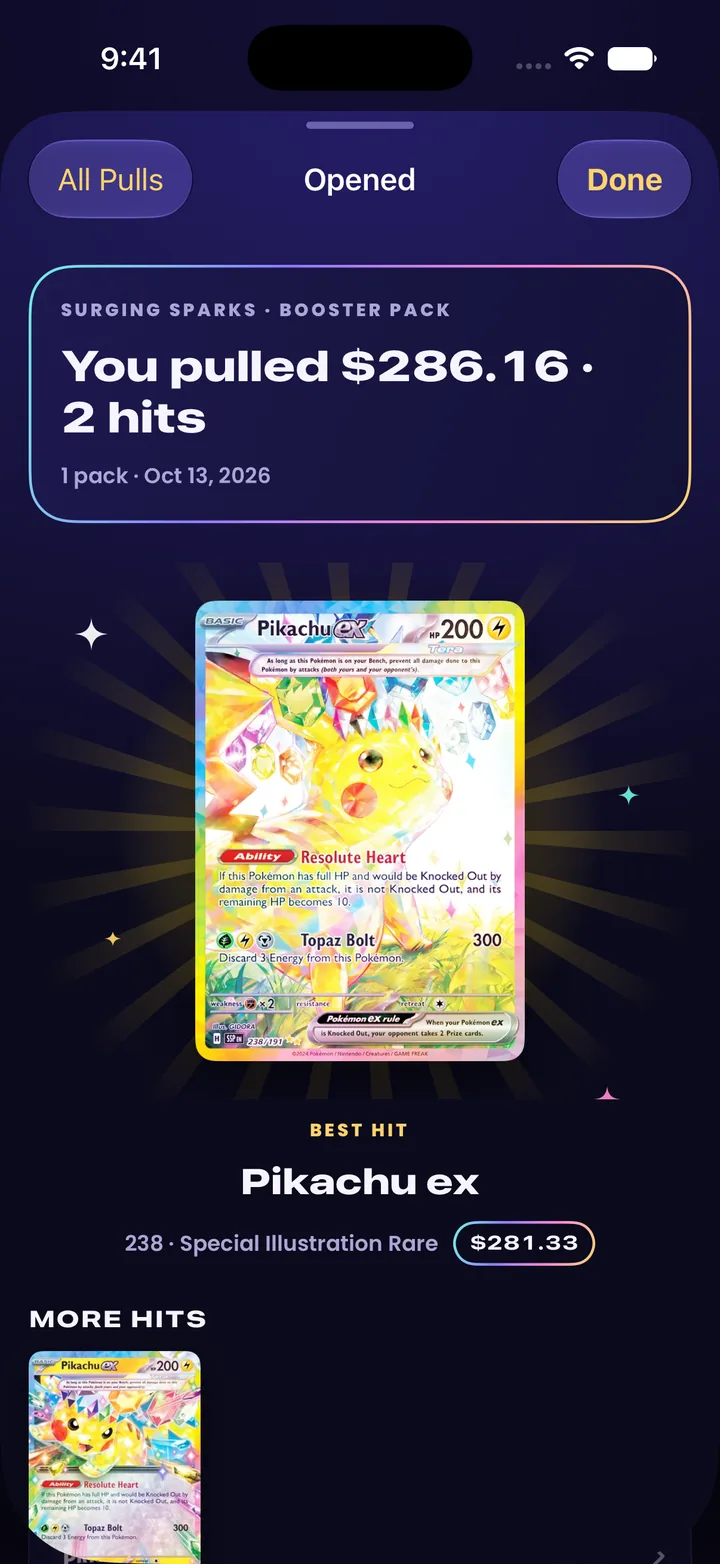
Log every pack
Tap in what you pulled. Hits mark themselves, and the best one gets its moment.
-
Chase what you love
Set a goal by set, rarity, type or artist and watch the checklist fill in as you collect.
-
Scan a whole binder page
Nine cards in one photo, matched and priced. Or scan one card at a time, or search by name or number.
-
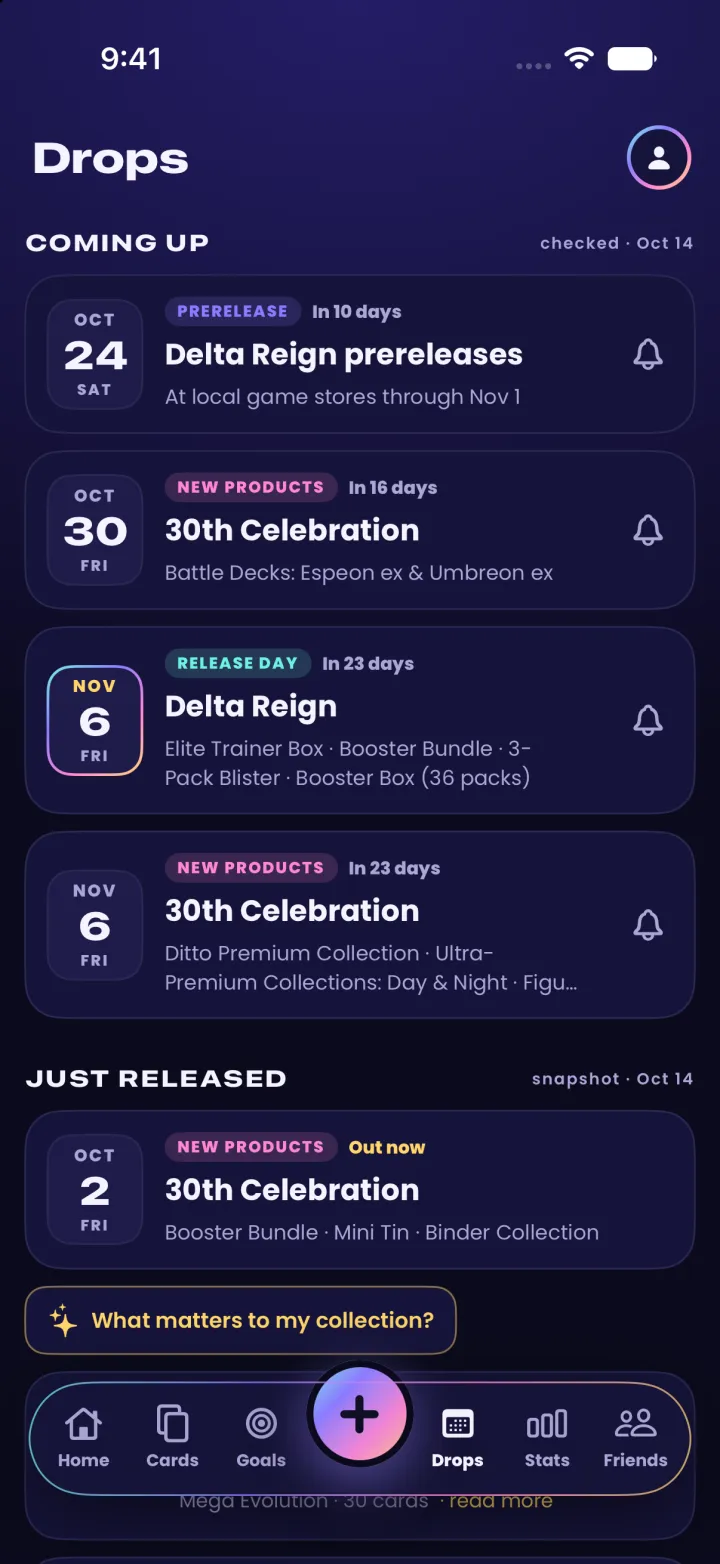
Never miss a release
Upcoming sets and products with reminders, card shows near you, and the stores that carry them.
-
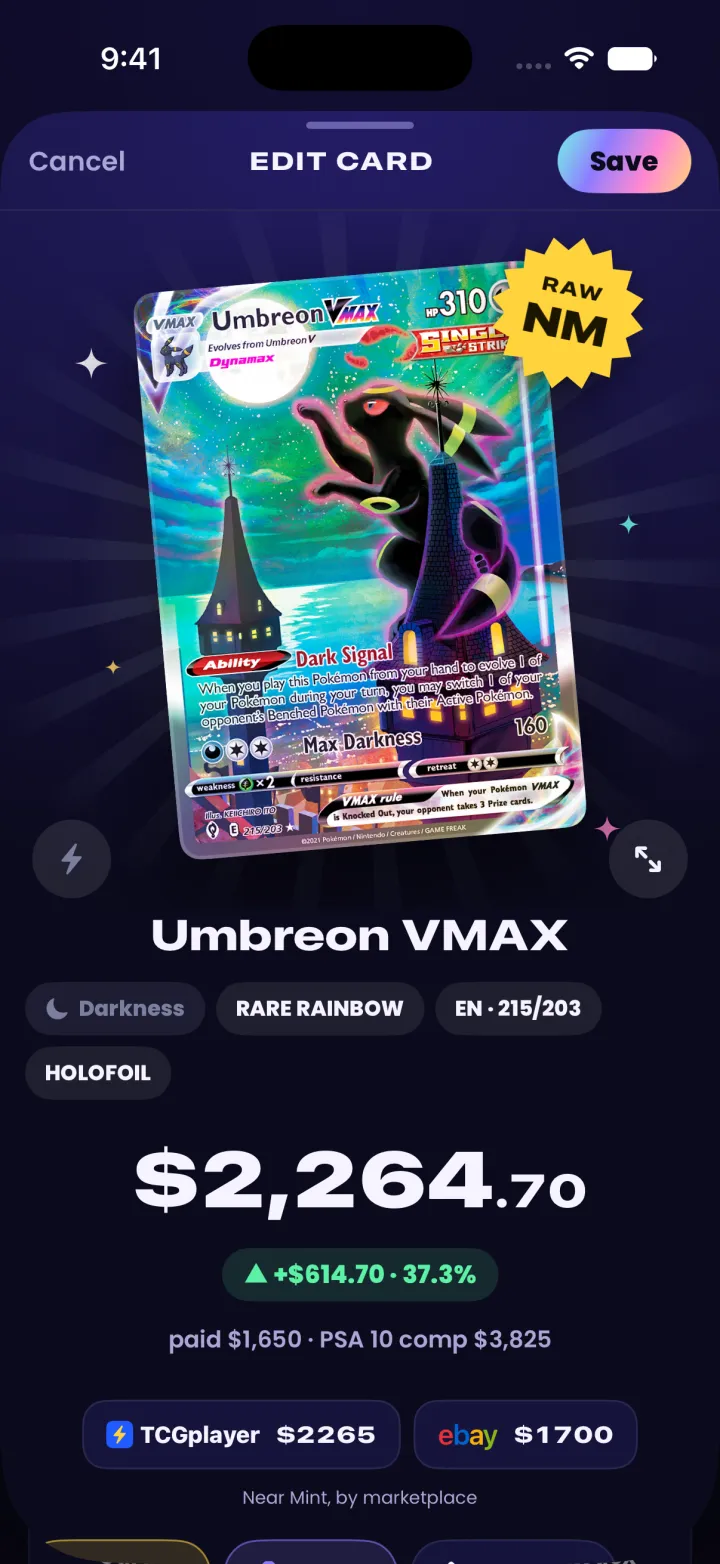
What you paid, what it's worth
Each card's market price, your gain since you bought it, and what a PSA 10 sells for.
-
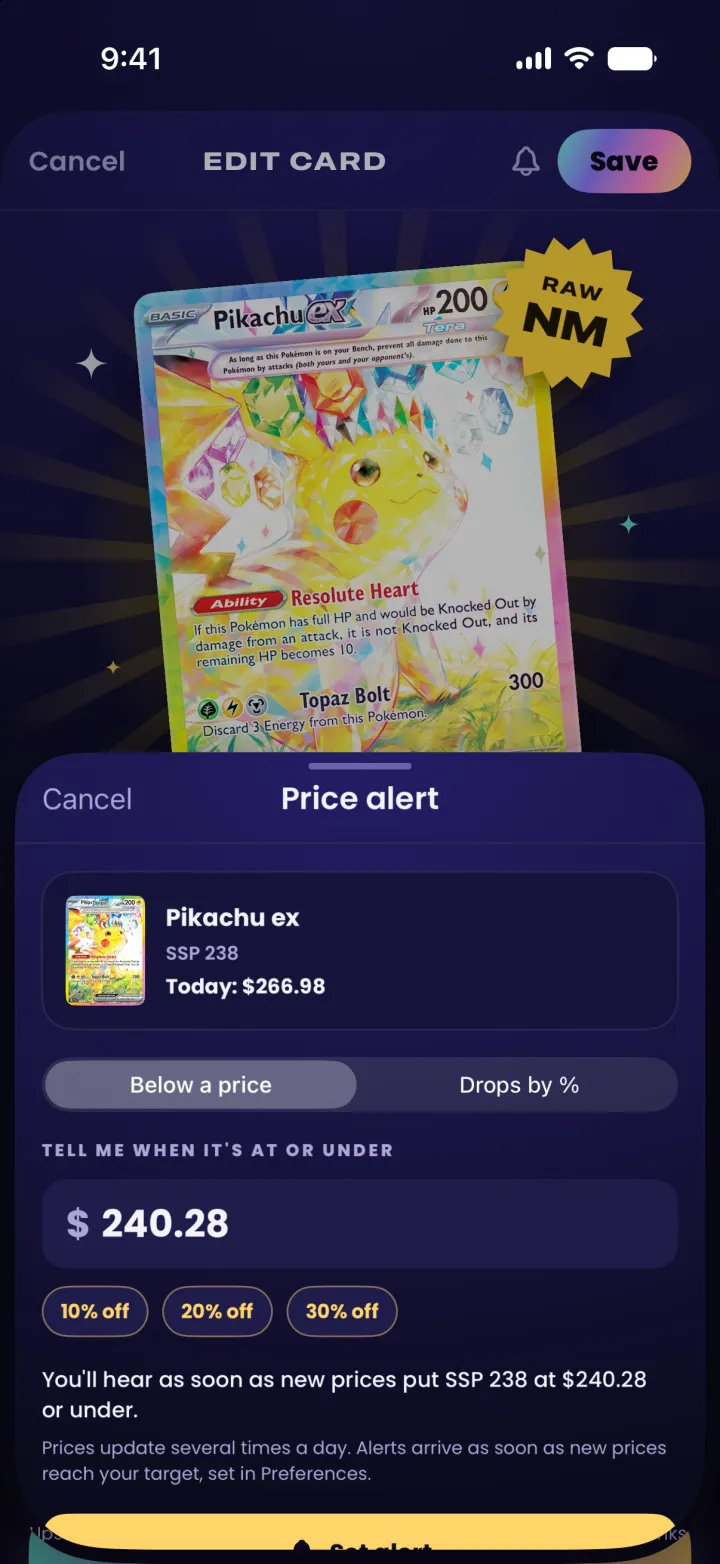
Hear when it hits your price PRO
Tap the bell on any card, name a price or a fall in percent, and get a notification as soon as it gets there.
-
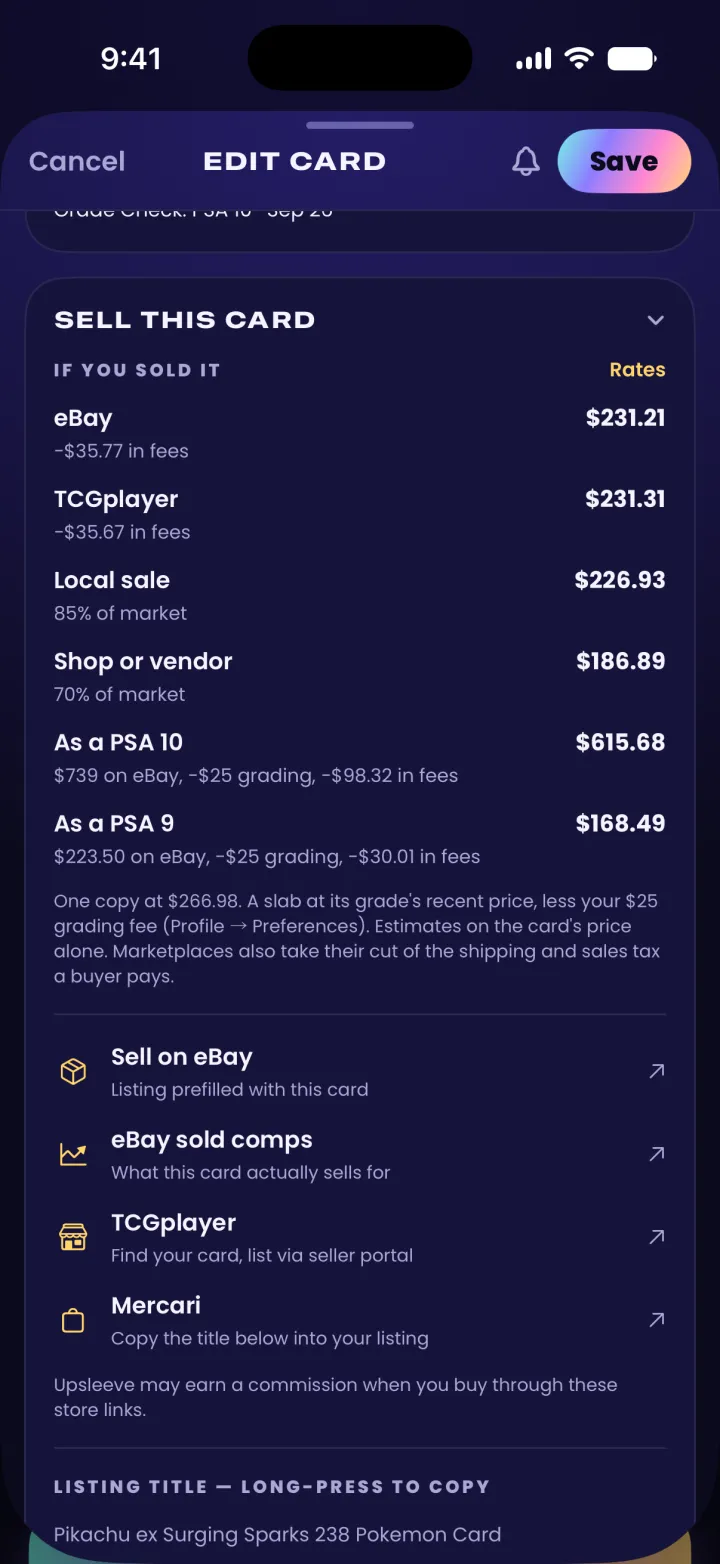
What a sale would leave you
After eBay or TCGplayer fees, in a local sale, or as a PSA 10 once grading is paid for.
-
Know a fair trade
Their cards and yours side by side at market price, so both sides see what's fair.
-
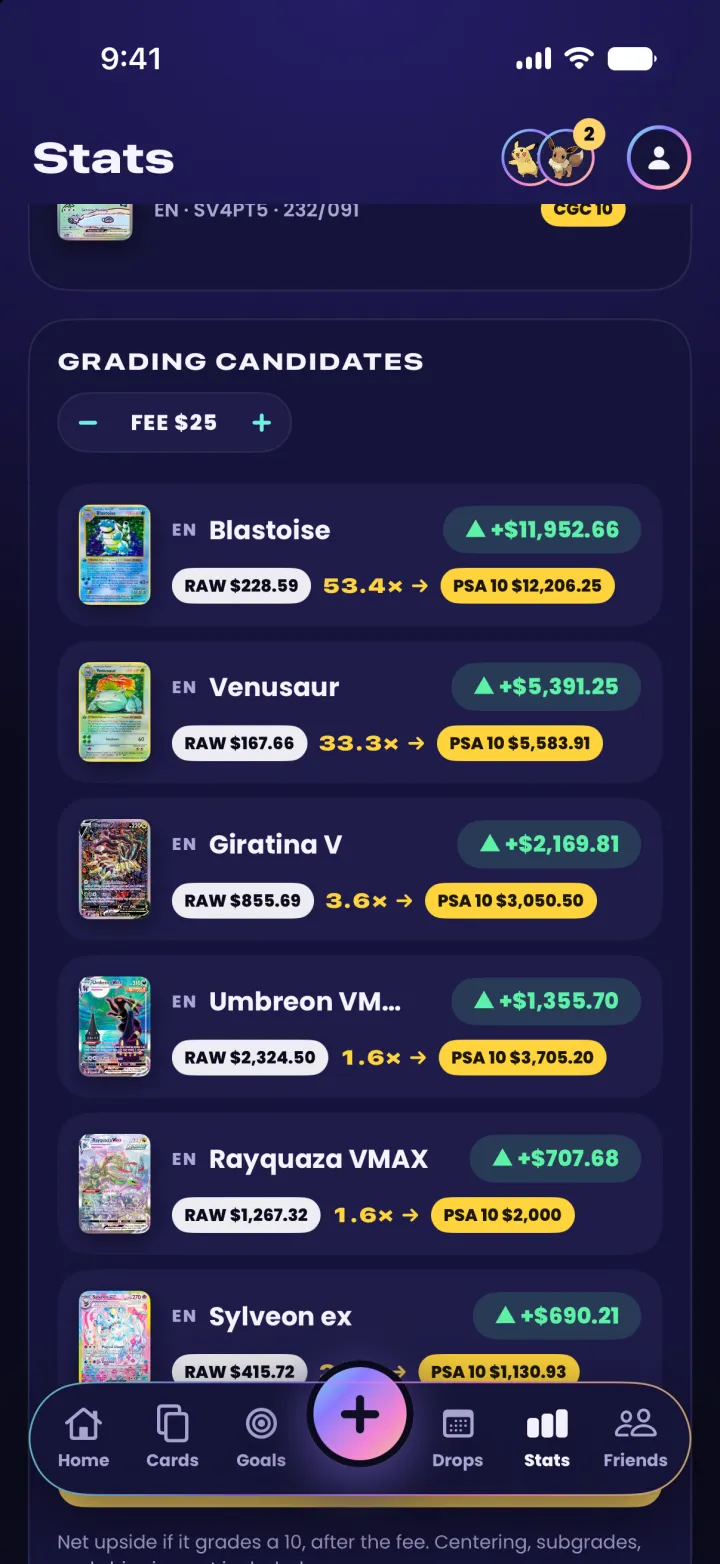
Know what's worth grading PRO
Your raw cards, ranked by what a 10 would add after the fee.
-
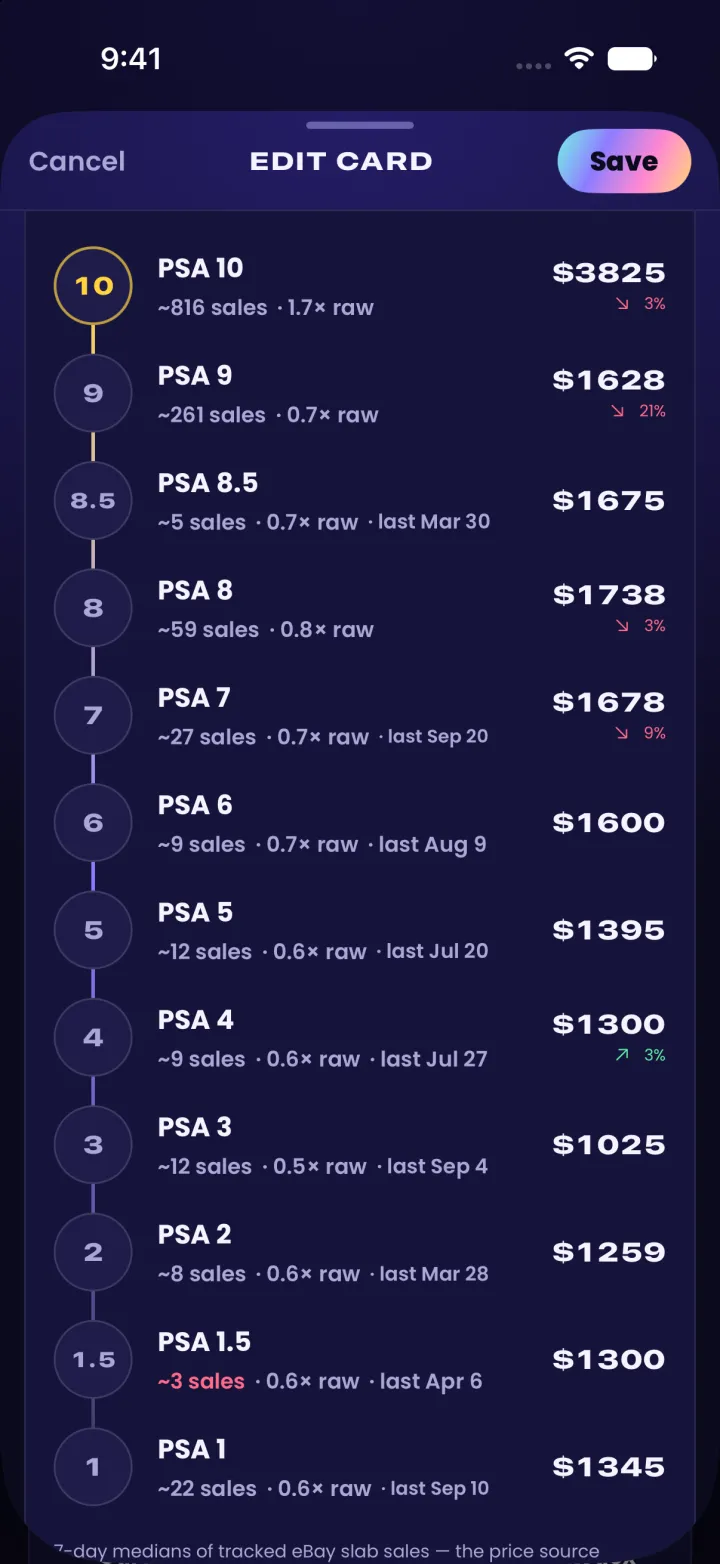
The price at every grade PRO
Every grader's ladder, and the sales behind each price.
On your computer too
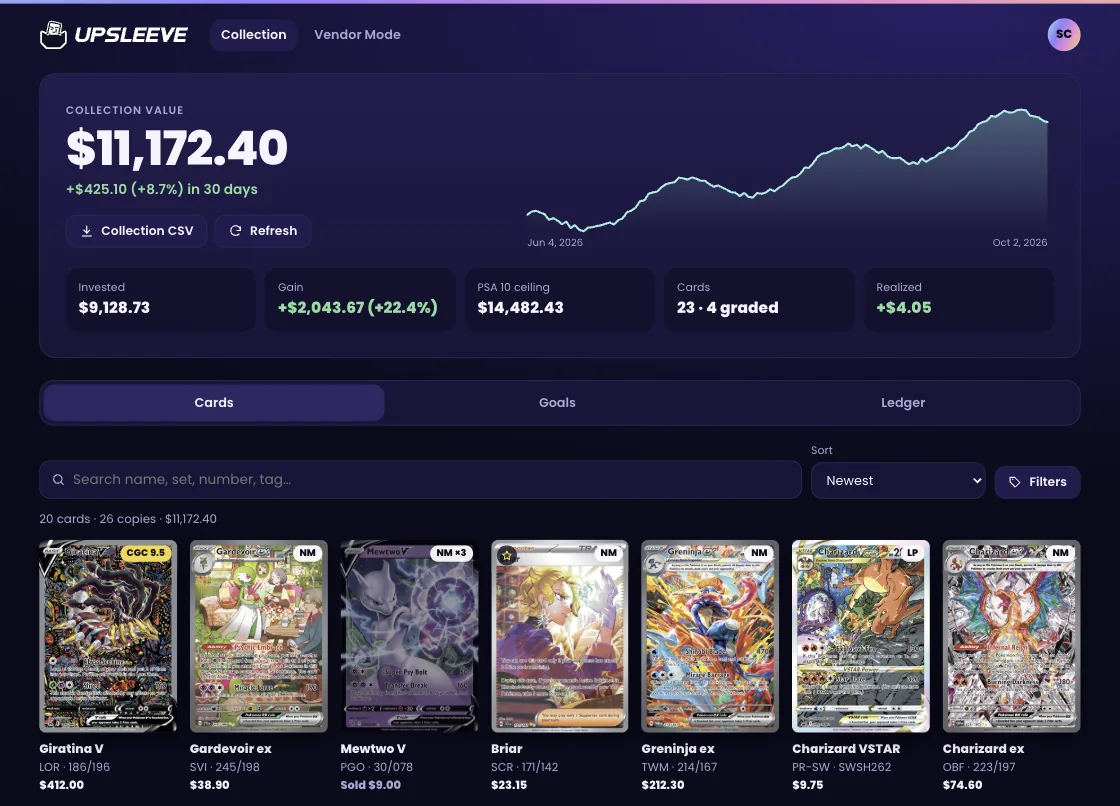
Sign in at upsleeve.app with the same account and your collection is there: every card, its value, your goals and your ledger, with the app's filters and a spreadsheet to download.
Vendor Mode comes along, with room for a whole stack and a second screen to face the customer.
Everything your binder can't do
One app for the cards you own, the cards you're chasing, and the ones coming out.
-
Scan cards fast
Point the camera at a card and the scanner locks on, outlining it in foil with the name it reads. Photograph a binder page and get all nine back, or search every set by name or number, in English and Japanese.
-
Log every pack
Tap in what came out of a pack. Hits mark themselves, your best pull gets the spotlight, and the cards go into your collection in one tap.
-
Prices through the day
Market prices for raw and graded cards, updated several times a day, and your collection's value over time, card by card and in total.
-
Film your pack openings PRO
Record an opening with the scanner on. Each card's price pops up as it comes out of the pack, beside what the pack cost and your profit so far, and Sly dances for the big pulls. Save it, or post a cut of the hits to Instagram or Facebook in one tap.
-
Scan a slab
Point the camera at a PSA, CGC, Beckett or SGC slab and Upsleeve reads its label: the card, the grade and the cert number, with a link to check the cert with the grader.
-
Your favorites up front
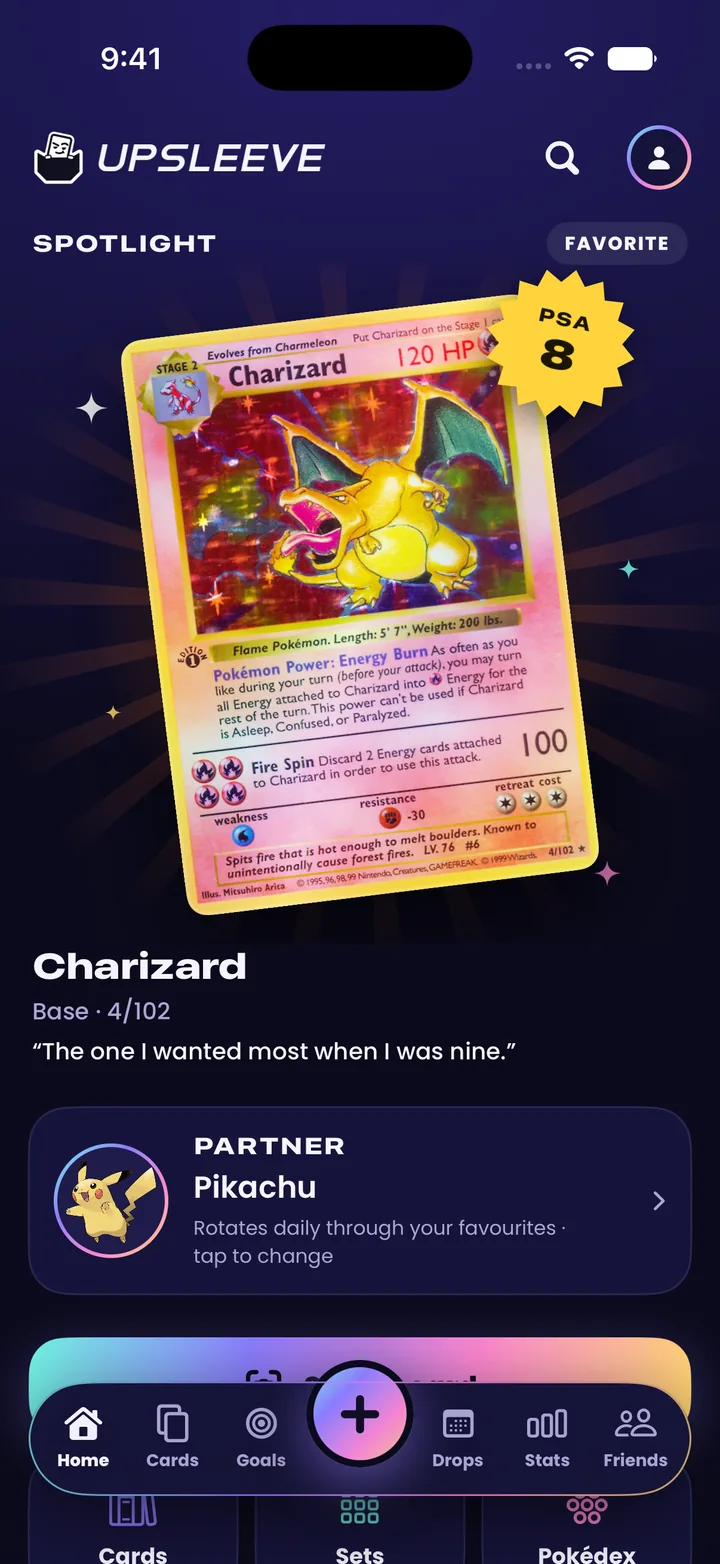
Star the cards you love. One takes the spotlight on Home each day, with the note you wrote on it or the day it joined your collection. Your first card and a finished set get a moment of their own.
-
Finish your sets
Set a goal for whatever you chase: a set, every variant of it, a Pokémon, what's in the picture, or a list you pick. See what's missing, and fill a TCGplayer cart with it in one tap.
-
Binders like the real thing
Make binders, fill them pocket by pocket and turn the pages, or scan your real binder's pages and each card goes in the pocket it was in. Every card shows its binder, page and pocket, and a binder's pages share as pictures.
-
Know a fair trade
Trade check puts their cards and yours side by side at market price, so both sides can see what's fair before they shake on it.
-
Price alerts PRO
Tap the bell on any card and name your price, or a fall in percent. You hear as soon as new prices get it there. Turn on eBay deals to hear about listings under your price minutes after they go up.
-
Friends, if you want
Share a link to your collection, follow friends and see their big pulls. Everything is private until you choose otherwise.
-
Releases, shows and stores
Countdowns and reminders for upcoming products, card shows near you, and the stores that carry them.
-
Sealed products
Scan a box's barcode and it sits beside your cards, priced like the rest. Set goals for the sealed products you're after too.
-
Grade Check
Photograph a card to measure its centering, get an estimate of its corners, edges and surface, and see whether grading is worth the fee.
-
What it would sell for
Each card shows what a sale would leave you after eBay or TCGplayer fees, or as a PSA 10 after the grading fee. With Pro, the same for your whole collection.
-
A report for your insurer
Every card and sealed product you hold, with its condition or grade, what you paid and today's value, most valuable first. Save it as a PDF and a spreadsheet.
-
The Upsleeve 100
One number for 100 widely traded cards, updated every day in the app, and how your own cards did against it.
-
Every device, and the web
A free account backs up your collection and keeps it the same on every phone you sign in on, iPhone or Android, and at upsleeve.app on a computer. Share a phone? Each account keeps its own collection on it.
Also: grading submissions from sent to returned, your own photos of your cards, each card's 90-day and all-time highs, recent sales, every card by its artist, and Home Screen widgets for your favorite card and your collection's value.
Selling at card shows? Vendor Mode runs your table.
New in Upsleeve
Bring your cards with you
Keep your cards in another app? Export them as a file and open it in Upsleeve. Each card is matched to its picture and price, and you see everything before anything is added. No export? Scan your binder pages instead, nine cards at a time.
- Collectr
- PriceCharting
- Dex
- Any spreadsheet
- Free
Collect together
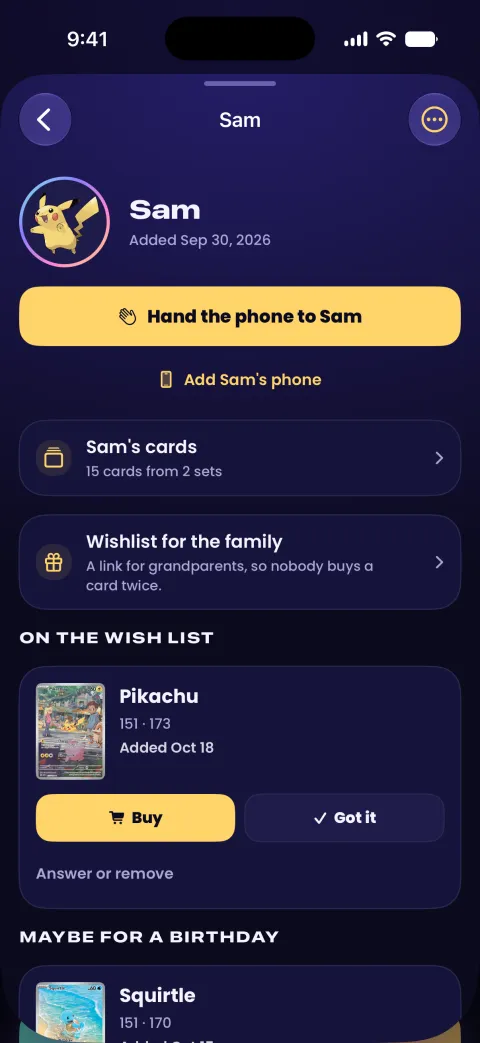
Add your kids to your account. Each gets a screen of their own, with their cards, binders and wish list, and no prices, no links out and nothing to buy.
They can use your phone, or a phone of their own: you make them a sign-in name and password, so they never need an email or an account.
-
A screen of their own
Kids find cards by Pokémon or by set, keep them in binders and star their favorites. No friends, no messages and no prices.
-
Their own scanner
They scan their cards straight into their collection and their binders. The phone reads each card itself, so nothing a kid scans goes to an AI.
-
Wish lists that come to you
A card they want goes on a list only you see. Buy it on TCGplayer, save it for a birthday, or share a link the grandparents can use.
-
Their own phone
Make them a name and password in Profile → Family. Their cards stay in your account, so you see what they add, and a lost phone loses nothing.
-
Family sets
Everyone's cards count toward each set, so you finish it together. Hand a card of yours down to a kid when it's theirs.
-
A trade table
Two kids swap cards, and you see how even the trade is before anyone lets go.
Your collection stays yours
Your collection is saved to your free account and kept on your phone. Everything is private until you choose to share it.
- No ads
- No tracking across apps
- Data never sold
- Delete your account any time
Free to use. Pro when you want more.
Everything you need to keep a collection is free. Upsleeve Pro removes the monthly limits and adds the numbers collectors grade by.
Free
Your whole collection, priced through the day.
- Scan cards and slabs, and search every set
- Bring your cards from another app
- Prices through the day and your collection's value over time
- Goals, binders, packs and sealed products
- Releases, card shows and nearby stores
- Your kids' own screens and wish lists
- A free account for backup, sync and friends
- A report for your insurer
- Vendor Mode price checks at a card show
- Each month, a few free uses of every Pro feature, like 5 binder pages, 2 pack-opening videos and 1 AI grade check
Upsleeve Pro
No monthly limits.
- Slab prices on every card, from every grader
- Which of your cards to grade, after the fee
- Unlimited binder scans, AI grade checks and pack-opening videos
- Price alerts on any card, and eBay deals
- Full price history, up to five years
- What your whole collection would cash out for
- Your AI ledger brief, whenever you want it
- Releases picked for the cards you collect
- Vendor Mode records your buys, trades and sales
Pro is a subscription billed by Apple on iPhone and by Google Play on Android. Cancel any time in your iPhone's Settings or in the Play Store.
Selling at a card show?
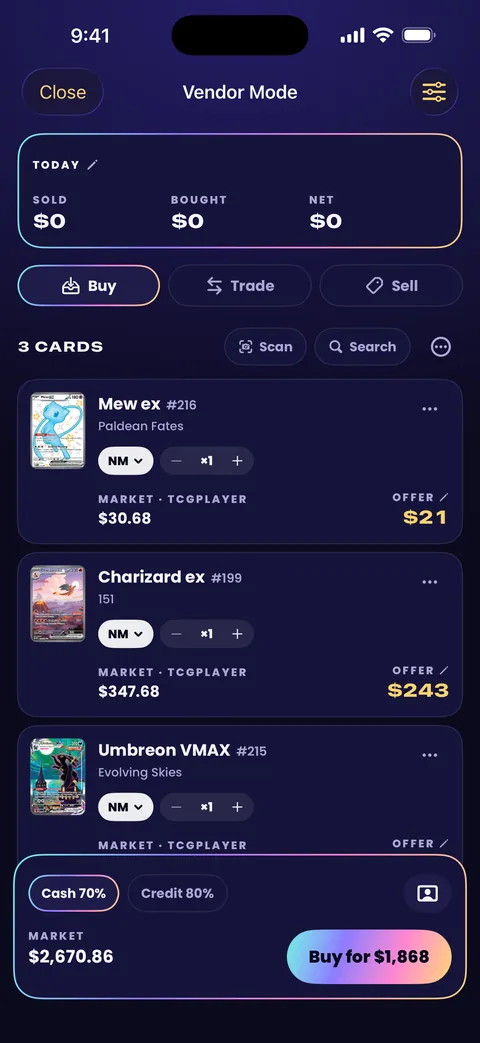
Vendor Mode prices a buy, a trade or a sale in seconds: scan a customer's stack and see each card's market price and your offer, in cash or credit, with the day's totals. Price checks are free.
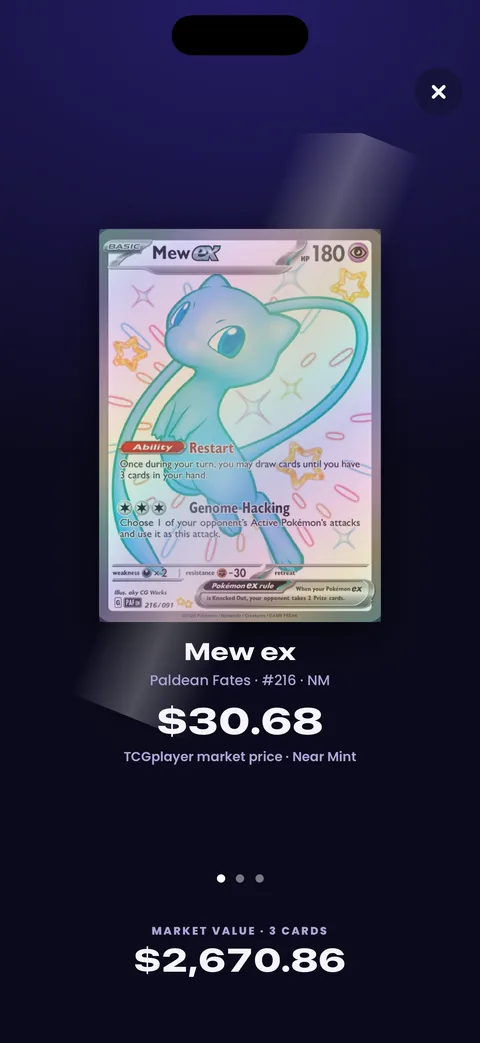
Turn the phone around and the customer view shows the card and its market price, and nothing of your margins.
-
Your percentages
Set what you pay in cash and in trade credit, and what you sell at, as a share of the market price: 70, 80 and 100 to begin with. Cheap cards and big ones can have rates of their own.
-
Stock and stickers
Mark what's for sale, cards and sealed products, with a sticker price on each. A card's sticker gets a flag once the market moves away from it, and “Get ready for the show” brings them up to date in one tap.
-
Price tags
A tag for every sticker, as a sheet of 30 or sized for a DYMO or Brother label roll. Print with AirPrint, or open them in your printer's app.
-
Shows and the books
Start a show with its table fee and costs, and every deal lands under it: what the show made, the money by payment method, and whether the cash box counts right. Hand over a receipt, undo a deal, and download it all as a spreadsheet.
-
Ready for a bad signal
Fetch today's prices for your whole stock before the doors open, and keep selling and trading without signal. A customer's card prices itself when the signal is back.
-
Two phones, or a computer
Two phones on one account stay in step at the same table. On a computer, Vendor Mode runs in a browser at upsleeve.app, with a second screen to face the customer.
Price checks are free: scanning, offers, the customer view and weighing a trade. Keeping the records (deals, stock, tags and shows) is part of Upsleeve Pro.
Questions
Which cards does Upsleeve cover?
Pokémon TCG cards, in English and Japanese. Search every set, or scan the cards you have.
Can I bring my cards from another app?
Yes. Export your collection from Collectr, PriceCharting or Dex, or save a spreadsheet as a CSV file, then open it in Upsleeve or share it to Upsleeve from your email. Each card is matched to its picture and price, and you see everything before anything is added. Some apps export only on a paid plan, and some not at all: then scan your binder pages, nine cards at a time.
Where do prices come from?
Prices come from PokeTrace. Raw card values use TCGplayer market data for English cards, updated several times a day. Graded values come from sold listings. Every price is an estimate.
Can my kids use Upsleeve?
Yes. Add them in Profile → Family with a first name and a Pokémon picture. Each kid gets a screen of their own with their cards, binders and wish list, and no prices, no links out, no friends, no messages and nothing to buy. They can use your phone, or their own with a name and password you make for them.
Do I need an account?
Yes, a free one, made in a tap with an account you already have: Apple, Google, Microsoft or Facebook. Your collection is saved to it, so it's backed up, the same on all your devices and on this site, and you can share with friends. A kid doesn't make one: a parent adds them to the family, and on a phone of their own a kid signs in with a name and password the parent makes. Delete your account whenever you like.
Can I use Upsleeve on a computer?
Yes. Sign in on this site with the same account to see your collection and use Vendor Mode in a browser. Adding and editing cards happens in the app.
Is there an iPad or Android version?
The Android app is the whole app, on phones and tablets, and it's on Google Play now. iPads can run the iPhone version, which is on the App Store. On any computer, the website shows your collection.
Does Upsleeve earn money from store links?
Links to stores such as TCGplayer, eBay and Best Buy may be affiliate links. If you buy through one, Upsleeve may earn a commission. The price you pay is the same.
More answers on the Support page.

Out now on the App Store and Google Play
Upsleeve for iPhone and Android is here.
Download on the App Store Get it on Google Play